


OtterAI Transcribe Voice Notes
4.74.61K Reviews
App Specs
- Version
- 3.106.0-6848
- Updated On
- License
- Free
- Downloads
- 5,000,000+
- Developer
- Otter.ai
- Categories
- Productivity
- Platform
- Android, iOS
Screenshots
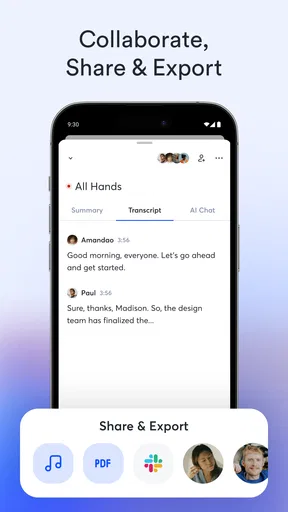
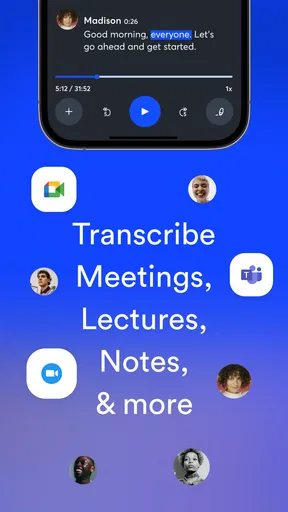
 Analysis by AppCompare
I find OtterAI most useful when I need to stay present in a conversation without trusting my memory to reconstruct it later. It turns spoken discussions into searchable text, which can save time after a meeting or interview, but I wouldn’t treat a transcript as a flawless substitute for listening carefully. My recommendation is strongest for people who regularly need written records of speech and are willing to review the important passages afterward.
A better fit for capture than for perfect minutes
What makes the app practical is the shift in attention it allows: instead of trying to write down every sentence, I can focus on the person speaking and use the transcript as a record to revisit. That is especially helpful when a discussion moves quickly or several people contribute. It also changes the work rather than removing it. I still need to check names, technical terms, and decisions before sharing notes with anyone else.
For that reason, I think of a transcript as a strong first draft. It can help me find a detail I would otherwise have missed, but it does not decide which details matter. A short follow-up note with the agreed actions can still be more useful to a team than a long, unedited record of every exchange.
That distinction is central to judging OtterAI Transcribe Voice Notes. As a productivity app from Otter.ai, it is aimed at turning speech into material I can work with afterward. Its appeal is less about replacing the human parts of note-taking and more about reducing the pressure to capture every word while a conversation is happening.
Getting Started with OtterAI
First off, setting up OtterAI Transcribe Voice Notes is a breeze. Simply download it from your favorite app store, and you're off to the races. The interface is sleek and intuitive, making navigation a piece of cake even if you’re not tech-savvy. Within minutes, I had it synced up with my calendar, ready to transcribe my next meeting.
Features That Stand Out
The real magic of OtterAI kicks in when you start using its speech-to-text capabilities. I found it impressively accurate, even with my tendency to mumble. It manages to capture the nuances of speech, which is a lifesaver for those of us who rely on detailed notes.
One feature that really blew me away was the app’s ability to identify different speakers. It’s like having a personal assistant who can keep track of who said what during a lively discussion. Perfect for meetings where everyone has something to say!
Worth Reading Before You Choose

EA SPORTS FC Mobile 26 Is a Bigger Football Game, but It Takes Time

Flipboard Shows What News Apps Must Do Beyond the Feed

Switching to Android Auto Means Rethinking Your Driving Routine

Google Calendar Makes a Crowded Week Easier to Manage

Ludo King Makes the Most of the Minutes Between Plans

Baby Panda World Brings Quick Play to Modern Phones, but Its Game Library Feels Busy
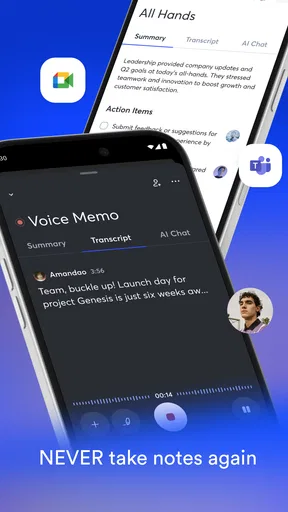
Another cool aspect is its integration with other platforms. Whether you’re using Zoom, Google Meet, or any other major conferencing tool, OtterAI slides right in, making it easy to record and transcribe on the go.
Making transcripts useful after the conversation
A small workflow change makes a big difference: I would mark down a few search terms or agenda topics as soon as a meeting ends, while the context is fresh. Later, those terms help me jump back to the relevant parts rather than rereading a whole transcript. This is more dependable than expecting the app to know which comments were decisions and which were just discussion.
When several people speak, speaker labels are most useful as navigation clues, not as unquestionable attribution. Similar voices, interruptions, and people speaking over one another can make any automated separation less clear. If I’m quoting someone or assigning an action to a particular colleague, I would replay the passage and confirm it before circulating the note.
There is also a useful trade-off between recording everything and capturing only what matters. For a planning session, a full transcript may preserve the reasoning behind an idea. For a brief check-in, it can create more text to sort through than the meeting deserves. I would reserve recordings for conversations where a searchable record is genuinely valuable, then turn the outcome into a concise summary of decisions and next steps.
Practical Uses in Everyday Life
Now, you might be wondering, "How do I actually use this in real life?" Well, let me share a few scenarios where OtterAI can really shine. Imagine you're in a brainstorming session. Instead of frantically jotting down notes, you can focus on contributing to the conversation while OtterAI captures everything.
Or maybe you’re a journalist conducting interviews. Instead of struggling to keep up with your interviewee, you can rely on OtterAI to transcribe every word, letting you engage more naturally. It’s also a game-changer for students attending lectures.
Where the time savings show up
One ordinary example is a project meeting that ends with a few people discussing deadlines while everyone is already preparing to leave. I can stay involved instead of typing throughout, then use the transcript to check what was agreed and write a short action list. The real benefit is not that the app produces perfect minutes; it is that I have a better source to consult when my memory blurs who volunteered for what.
For interviews, I would still make a quick note of an especially important phrase or topic while speaking with the guest. That gives me an anchor when I later review the transcript and helps me avoid relying on automated wording for a quotation. Students may find the same approach useful in lectures: listen first, jot down a few key themes, and use the transcript afterward to locate explanations that deserve a second look. A transcript should support learning, not become a reason to stop engaging with the material.
Compared with typing notes by hand, OtterAI is most compelling when the conversation is too fast or detailed for comfortable live note-taking. Compared with a basic voice memo, its text record is easier to scan for a particular point. But if I only need to remember one personal reminder, a quick typed note or ordinary recording may be simpler. The extra value appears when I expect to search, revisit, or organize a substantial conversation.
Accessibility and Flexibility
One thing I appreciate about OtterAI is how it caters to a wide audience. It offers various subscription plans, so whether you're a casual user or a professional needing extensive transcription services, there's a plan for you. Plus, the app offers a free tier, which is great if you want to test the waters before diving in.
For those of us who are constantly on the move, OtterAI also provides seamless cloud synchronization. This means you can access your transcriptions from any device, ensuring your notes are always at your fingertips.
Who should choose it, and who should look elsewhere
I would consider it for students who revisit spoken explanations, reporters who need to search interview material, and teams that want a record to check after discussions. It is particularly useful when I need to participate rather than act as the group’s dedicated note-taker. The free option also gives a newcomer a way to judge whether transcript-based work suits their routine before paying for more.
The app is less suitable if you need a verbatim record that can be trusted without review, or if your main goal is polished, concise meeting minutes with no editing. People who rarely record conversations may get more from a simple notes app. Likewise, if a conversation is sensitive, I would first consider whether recording is appropriate and make sure participants are comfortable with it; convenience should not replace good judgment.
Cost is another reason to think about your actual workload. OtterAI is free to start, while in-app purchases range from $12.99 to $99.99 per item. I would try the basic workflow first and only consider paying if I regularly use the transcripts and can point to a real time saving. The right choice depends on frequency and purpose, not on the assumption that more transcription is automatically better.
Compatibility is worth checking before making it part of a routine: the current version is 3.93.0-5274 and requires Android 6.0 or later. The app is rated for Everyone. Those details make it easier to decide whether it suits a device and household, but the more important test is practical: can I capture speech clearly, find the passages I need, and turn them into notes I will actually use?
Final Thoughts
In conclusion, OtterAI Transcribe Voice Notes is a powerhouse app that transforms how we handle voice recordings. Its accuracy, speaker identification, and integration capabilities make it an invaluable tool for professionals and students alike. While no app is perfect, OtterAI comes pretty darn close, making it well worth a spot on your device.
If you’re ready to revolutionize your note-taking experience, why not give OtterAI a try? You might find it’s just the app you’ve been waiting for.
My more measured verdict is that its strongest role is as a searchable companion to real listening. It has an average rating of 4.3 from around 26,000 ratings, with more than 4,000 reviews and over 5 million installs, so it has clearly reached a broad audience. Those figures are useful context, but they do not guarantee that every recording will suit every voice, room, or meeting style.
I would recommend trying it if spoken information regularly slips through the cracks in your day. Start with a low-stakes conversation, review the transcript, and see whether its saved time outweighs the cleanup it needs. If you want a dependable aid for capturing and revisiting discussions, it earns a place on my shortlist; if you expect a perfect, finished record with no human checking, I would choose a different workflow.
Pros
- Accurate voice-to-text transcription.
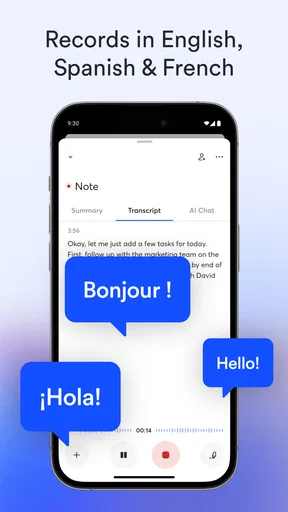
- Supports multiple languages seamlessly.
- Easy organization with folders and tags.
- Integrates well with other productivity apps.
- Real-time collaboration with team members.
Cons
- Free version has limited transcription minutes.
- Requires internet for optimal performance.
- Advanced features need a premium subscription.
- Occasional lag with long recordings.
- User interface can be overwhelming for beginners.
FAQs for OtterAI Transcribe Voice Notes
What is OtterAI Transcribe Voice Notes used for?
OtterAI Transcribe Voice Notes is designed to convert spoken language into written text. It's particularly useful for recording meetings, lectures, and interviews. The app uses AI-powered transcription to provide accurate and searchable notes, making it a valuable tool for students, professionals, and anyone who needs to keep track of spoken content.
Is OtterAI available on both Android and iOS platforms?
Yes, OtterAI Transcribe Voice Notes is available for download on both Android and iOS platforms. Users can find the app on the Google Play Store for Android devices and the Apple App Store for iOS devices. This accessibility ensures that users can seamlessly integrate it into their daily workflow, regardless of their device.
How accurate are the transcriptions provided by OtterAI?
OtterAI offers a high level of transcription accuracy, thanks to its advanced AI algorithms. While it performs well in clear audio conditions, the accuracy may vary with background noise or multiple speakers. Users can enhance accuracy by using high-quality microphones and minimizing ambient noise during recordings.
Does OtterAI offer real-time transcription?
Yes, OtterAI provides real-time transcription capabilities. This feature allows users to view transcriptions as they speak or listen, which can be incredibly useful during live meetings or lectures. Real-time transcription helps users stay engaged and ensures they don't miss important information as it happens.
Is there a free version of OtterAI, and what are the limitations?
OtterAI offers a free version with basic functionality, allowing users to transcribe a limited number of minutes per month. The free tier includes essential features like real-time transcription and basic sharing options. For extended features and higher transcription limits, users can upgrade to a paid plan.


